Changelog

July 6, 2026

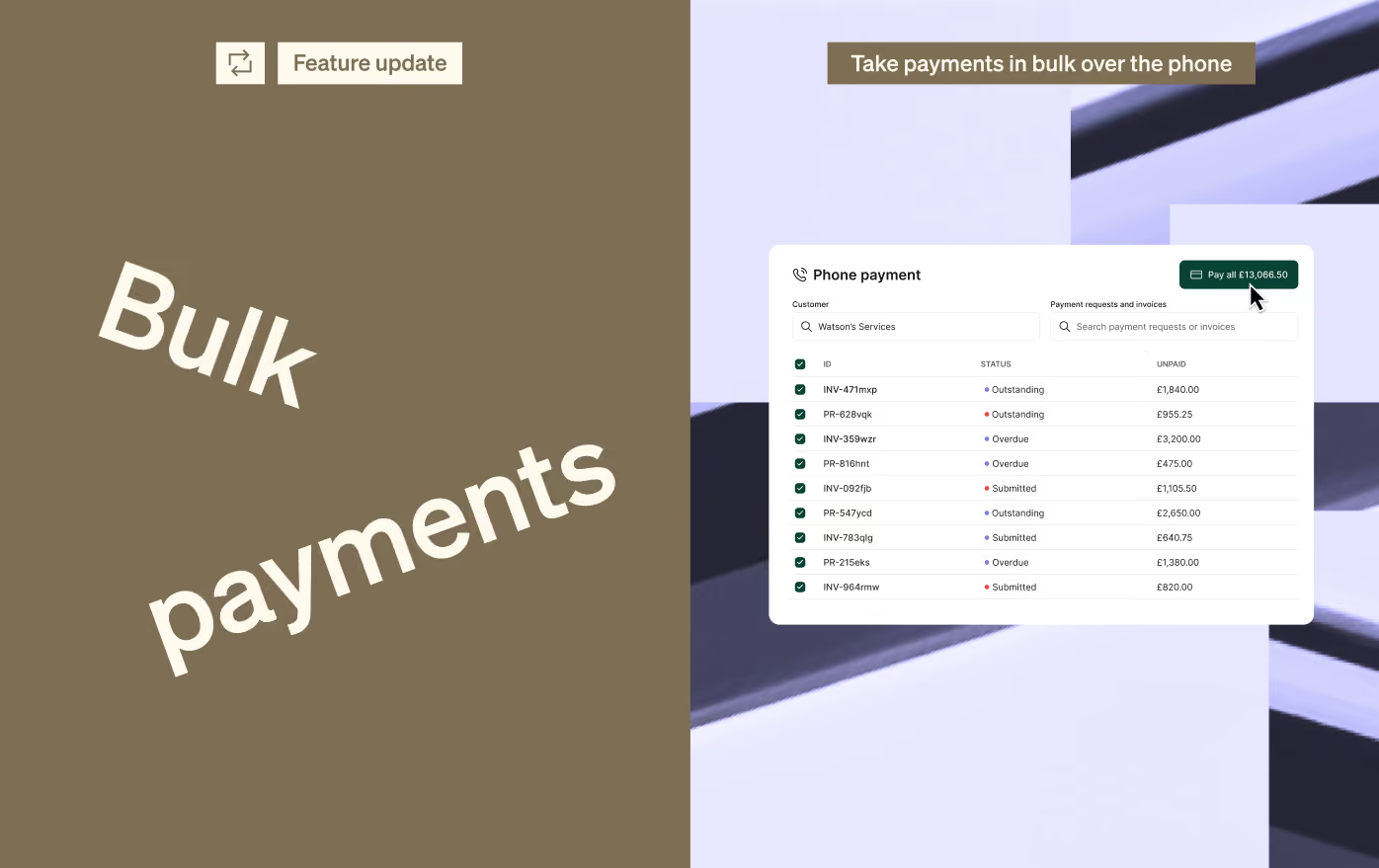
Take phone payments for multiple invoices

You can now take a single card payment over the phone for multiple outstanding invoices and payment requests.

When you select a customer, you’ll be able to choose which items they want to pay, then complete the payment using the card details they provide.
July 6, 2026

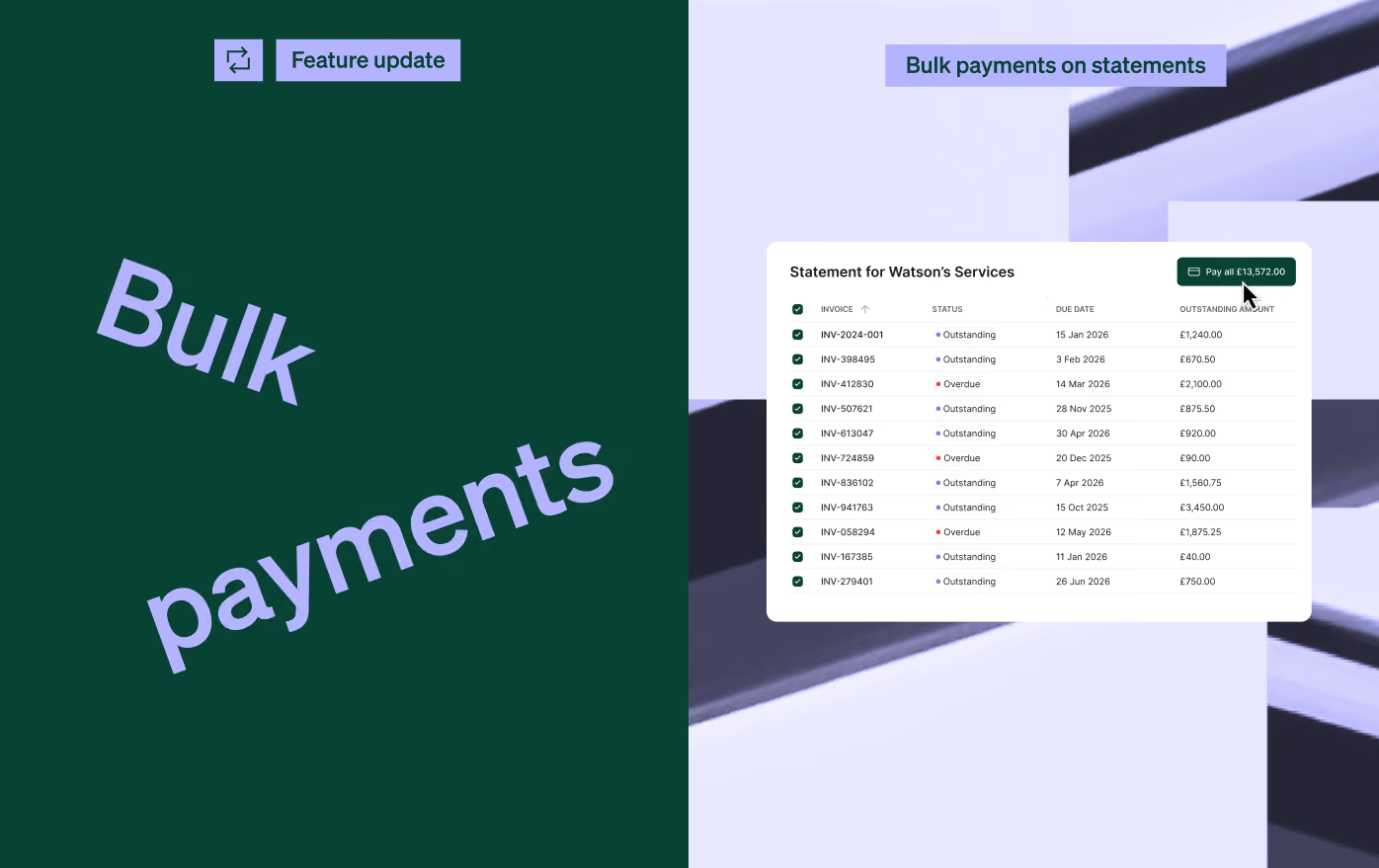
Bulk payments from customer statements

Your customers can now pay multiple outstanding invoices and payment requests directly from their customer statement.

When they receive a statement, they can choose which items they’d like to pay and make one payment for the selected total.
June 15, 2026

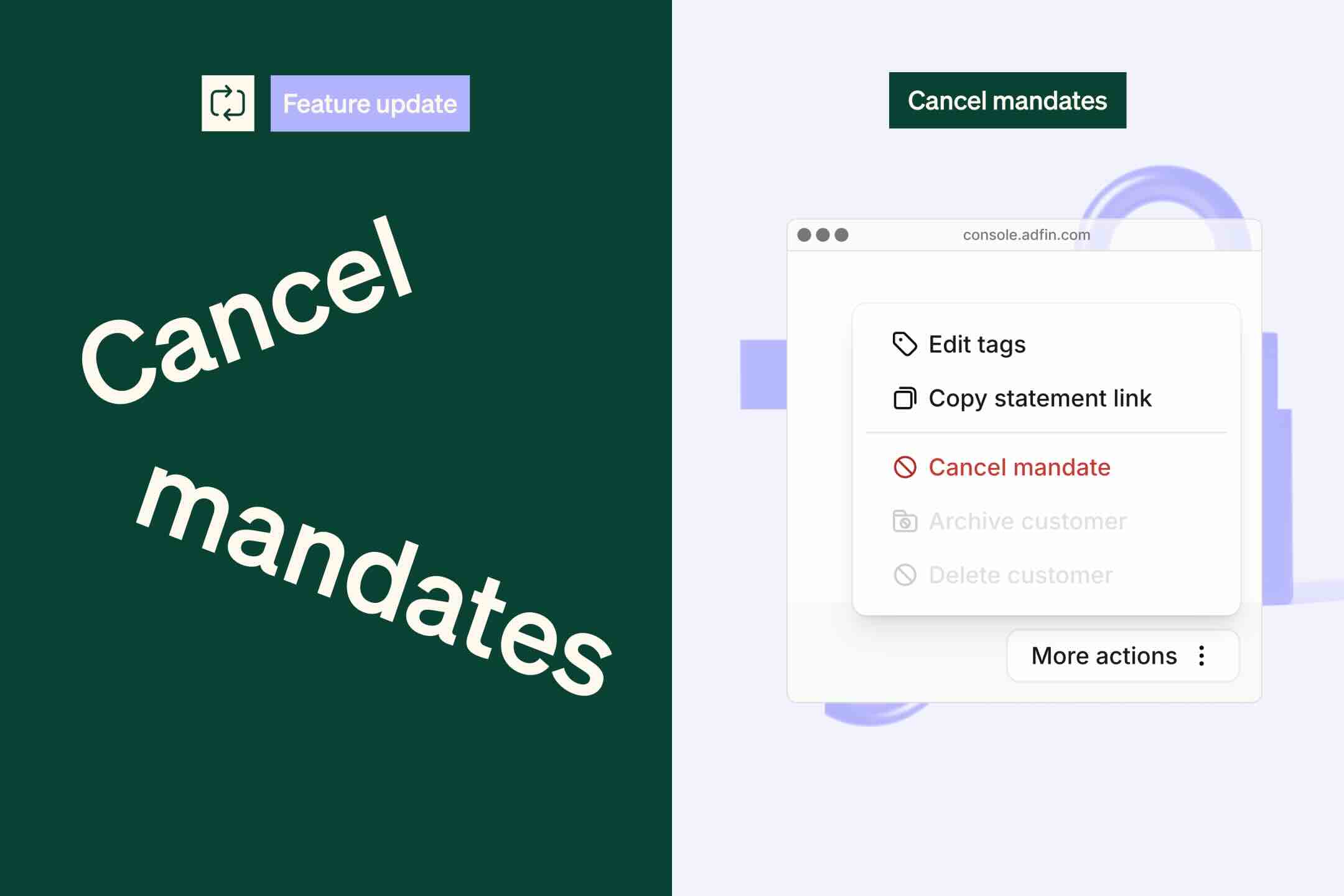
Cancel a direct debit mandate while payments are being collected

Sometimes a customer may ask you to cancel their direct debit mandate while a payment is already being collected.

If the collection has already started, it cannot be cancelled. You can now queue the mandate to be cancelled automatically once the payment collection is complete.

If the payment fails, we won’t retry the collection. We’ll simply cancel the mandate.

👉 To do this, select the customer, open More options in the side tray, and click Cancel mandate.
June 3, 2026

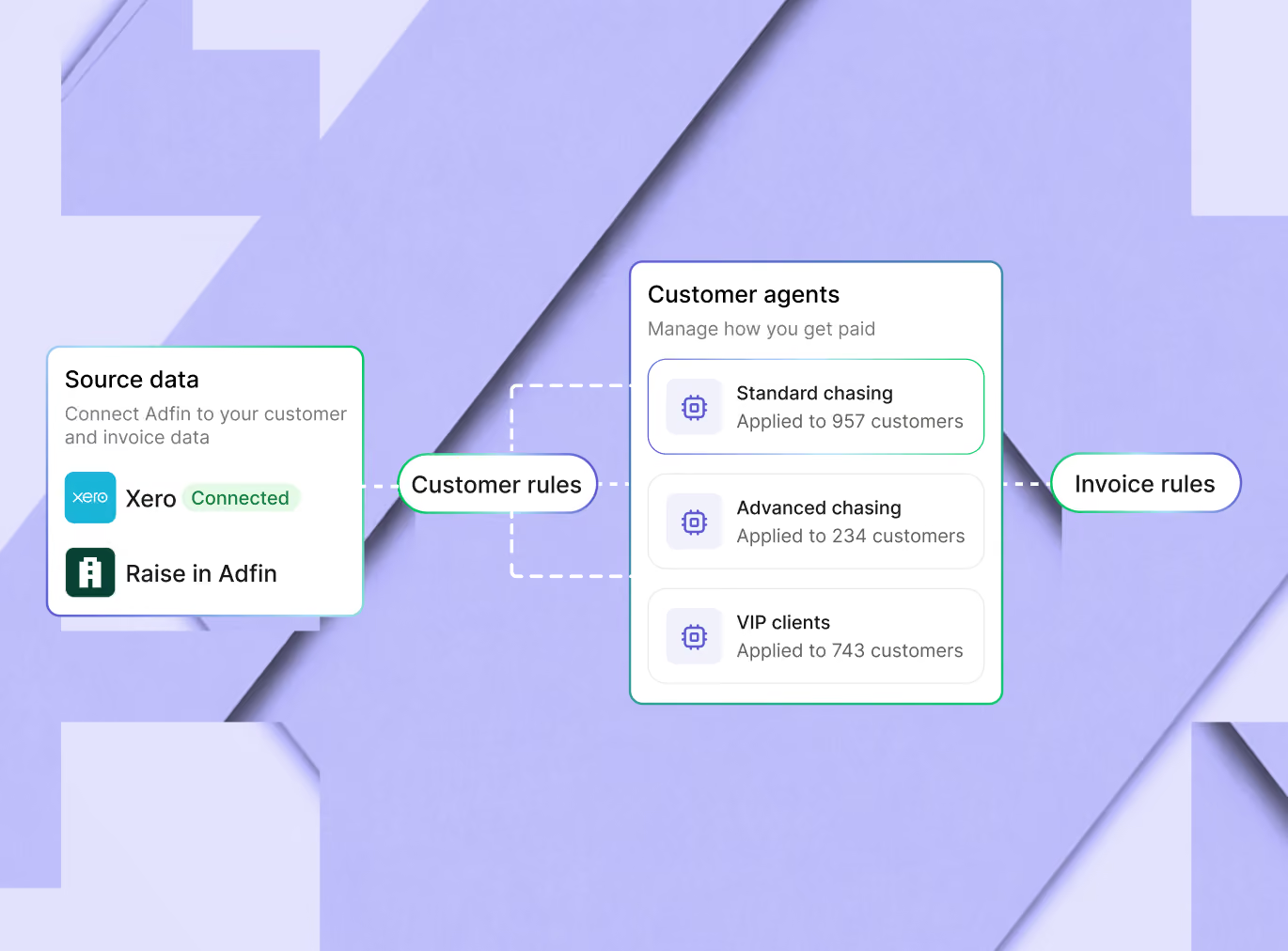
Introducing customer agents

Customer agents let you manage how payments are collected for different groups of customers.

Each agent brings together the rules for when to send reminders, how to communicate with customers, which payment options to offer, and what actions to take to help you get paid.

If your an existing Adfin user, customer agents replace and upgrade existing workflows. Your current setup has been migrated automatically, so there is no  change to how you collect or manage payment collections.

As part of this launch, we’re also introducing support for late fees, giving teams more flexibility to apply charges to overdue invoices where needed.

You’ll see customer agents in your Adfin account as part of our staged rollout.

👉 You can view your customer agents here
June 3, 2026

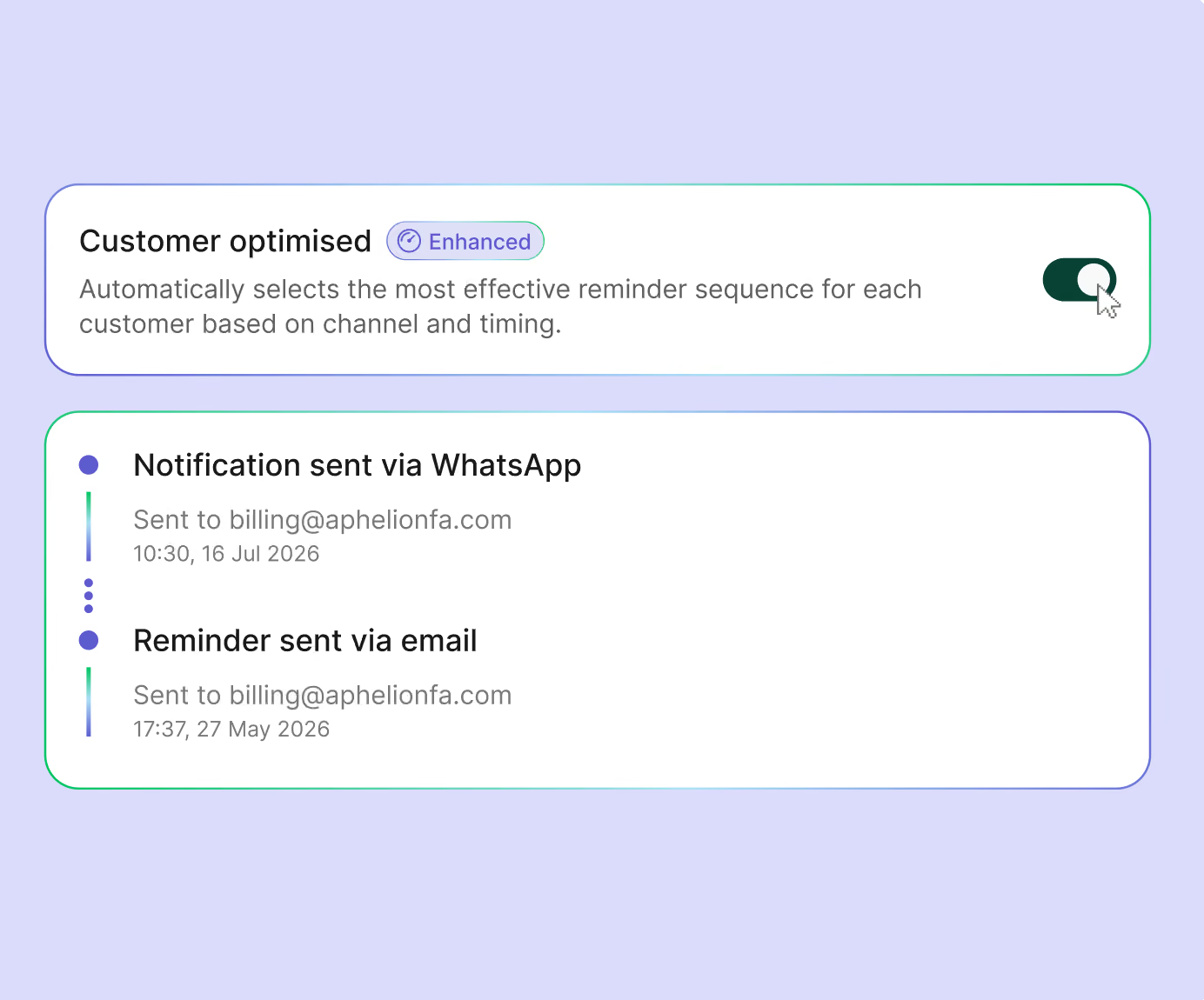
Optimised reminders for each customer

Most reminder sequences treat every customer the same: the same timing, the same channel, and the same follow-up.

Customer agents with optimised reminders change that. You set the approach for each customer group, including the channels, persistence, and actions the agent can take. The agent then works out the best way to encourage each customer to pay.

New customers start on a standard reminder sequence. Over time, the sequence adapts based on payment data, using the timing, channel, and cadence most likely to get invoices paid.

This means:

  • Faster payments with less manual work
  • More personalised payment reminders for your clients
  • Smarter chasing that improves as more payment data comes in

👉 Turn on client optimised chasing for an agent here
June 3, 2026

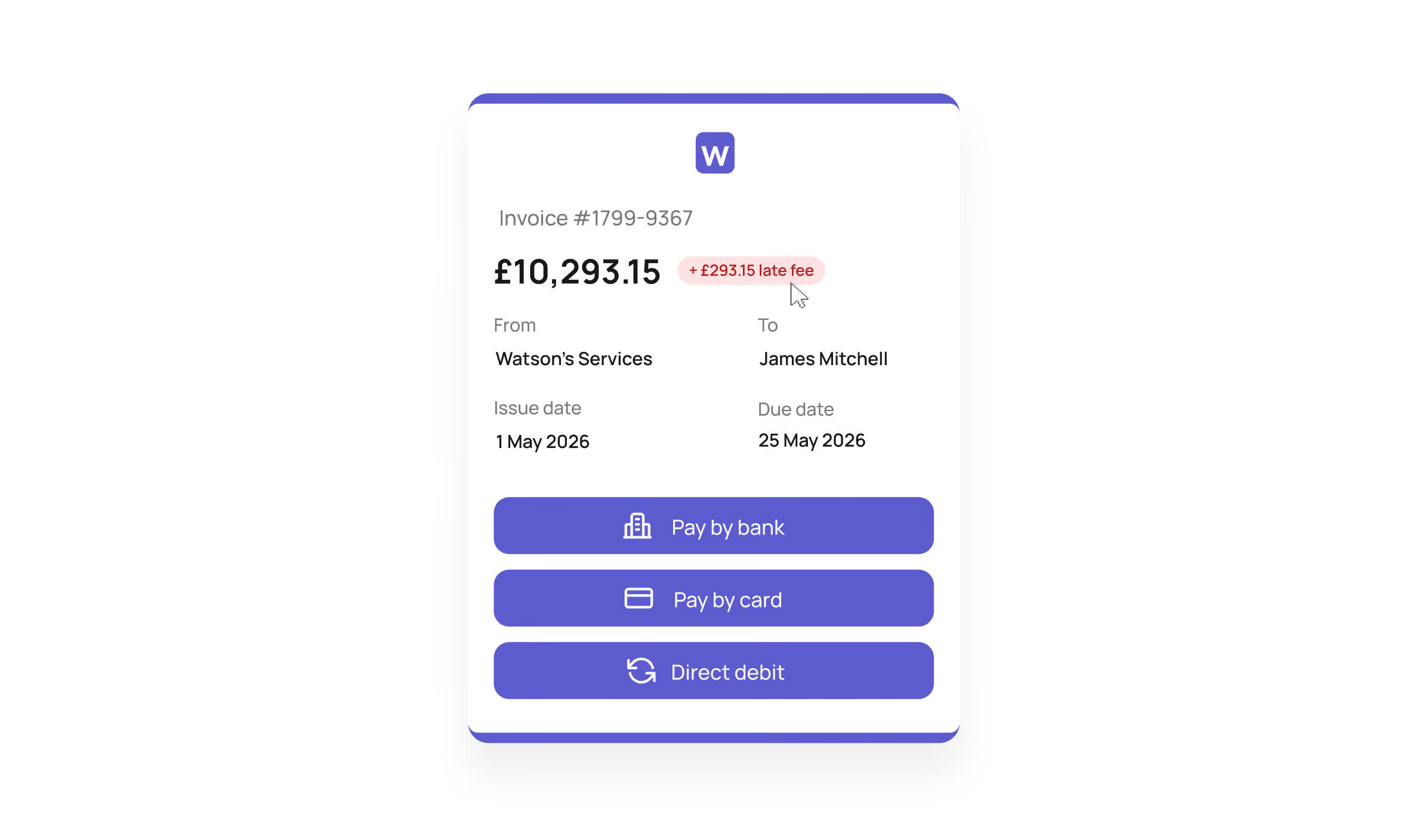
Automatically apply late payment fees

Businesses have had the legal right to charge statutory interest and fixed compensation on overdue invoices since 1998. But for many teams, the calculation and admin have made it hard to justify the effort.

You can now apply late payment fees automatically with Adfin.

When enabled for a customer agent, Adfin can apply statutory interest and fixed compensation once an invoice passes your chosen grace period. The payment link updates as interest accrues, and a separate invoice is created in your accounting software.

You stay in control:

  • Enable late payment fees for specific customer agents
  • Set a grace period before fees are applied
  • Waive fees where needed

With late payment reform gaining momentum in the UK, this gives your team an easier way to apply fees consistently and reduce the admin involved in overdue collections.

Good to know: fixed compensation is routed to Adfin. Statutory interest accrues to you.

👉 Turn on late payment fees for an agent here
May 11, 2026

Take card payments over the phone

📞 You can now take card payments from clients over the phone, so you can get paid immediately while speaking with them.

When you process a phone payment with Adfin, the payment is automatically linked to the correct invoice, making reconciliation simple and removing the hassle of standalone card machines

Don’t have the invoice in Adfin yet? No problem. You can quickly create a payment request by entering an amount and reference, then sync it to your accounting software for easy allocation later on.

Simply ask your client to read out their card details and enter them into the secure card capture form in the Adfin console. It’s quick, easy, and secure 🔒

You'll still be able to harness the full power of Adfin as payments over the phone support surcharging and partial payments too.

👉 Find it in Settings → Upgrade features → Payments over the phone.

This feature requires us to do a review of your account before we enable it. If you don’t see it yet, please contact support.

April 7, 2026

Preview adaptive templates before sending

Adaptive templates automatically detect placeholder text—like customer names, invoice numbers, or amounts—and tailor messages to each recipient ✨

This lets you send personalised payment reminders from your own email address without any manual work. In fact, payments requested with adaptive templates are paid 70% faster

To make getting started easier, you can now preview exactly how a message will appear to a specific customer while creating or editing a template.

Go to Settings → Adaptive templates, select a template, and click Preview to see what Autopilot will send 🤖

March 24, 2026

Clearer bank transfer details for faster payments

When customers choose to pay by bank transfer, they’ll now see your business name as the account holder, making it clearer who they’re paying and increasing trust 🏦

Combined with Adfin bank transfer details on your invoices, this helps ensure payments are sent correctly and without confusion.

Even better, once a payment is made, we automatically match and allocate it to the right invoice, so you don’t have to reconcile anything manually ✨

March 18, 2026

Your control centre to track performance and get paid faster

We’ve launched a brand new Overview dashboard. You can use this to understand your collections, stay on top of tasks, and take actions to get paid faster.

Clear insights on your payments and credit control

Our new charts give you a detailed view across credit control, cash flow, and revenue, including:

  • 💰 How Adfin got you paid: understand what is working and what isn't
  • 📈 Performance and benchmarking: see how your performance on late payments is improving and compares vs similar companies
  • 👤 Customer insights: monitor active customers and compare performance by payment method

If you're keen to dive deeper into any of the data then simply click through to load up the underlying payments.

A smart inbox for action

The new inbox gives you a single view of tasks and notifications, so nothing slips through the cracks. You can:

  • View and act on tasks to get paid (e.g. reinstating a direct debit mandate)
  • 💡 Act on recommendations to get more out of Adfin (e.g. enabling personalised reminders)
  • 👥 Assign tasks to team members so they can take action when needed
  • 🔔 Subscribe or unsubscribe from notifications, so you only see what’s relevant to you

👉 You can find the Overview dashboard in the side menu

March 17, 2026

Invoicing just got a major upgrade

We’ve made invoicing in Adfin more powerful than ever—helping you save time and stay in control.

Here’s what’s new:

Automatic bank transfer payment allocation ✨
Add Adfin bank transfer details directly to your invoice PDFs. When clients pay via bank transfer, we automatically match and allocate the payment to the correct invoice.

Xero tracking categories at line-item level 📊
Sync your tracking categories from Xero and apply them to individual line items for more accurate, granular revenue tracking.

Simple price updates for recurring invoices 😎
Update a product price once and it automatically applies across all your recurring invoices.

March 17, 2026

A better way to manage your recurring invoices and payments

We’ve introduced a new Schedules dashboard, giving you a single place to view, manage, and edit your recurring invoices and payments.

You can easily organise your schedules by customer, status, or type, and quickly see key details like the next charge date and end date.

Like all Adfin dashboards, you can:

  • 🔍 Apply filters and sorting
  • 💾 Save custom views for quick access

Managing schedules is now simpler too — just select a schedule from the dashboard and follow the steps to make changes.

👉 You can find the Schedules dashboard in the side menu.

March 10, 2026

Track revenue with tracking categories

You can now use tracking categories in Adfin to track revenue across different areas of your business — such as offices, departments, or service teams 📊

Tracking categories are configurable sets of custom fields that can be applied at the invoice line item level, giving you more granular visibility into where revenue is coming from.

When creating an invoice in Adfin, you can simply select a tracking category option for each line item.

You can also set default tracking category options per customer, so the correct option is automatically preselected whenever you raise an invoice for them.

Once set up, you’ll be able to filter by tracking category options in both the Payments and Credit control dashboards.

If you use Adfin with Xero, you can sync your existing tracking categories directly from Xero, including any customer-level default options 🔄

👉 You can find this feature in Invoice settingsTracking categories ⚙️

March 10, 2026

Track customers and revenue by office

You can now set up offices in Adfin, making it easier to group customers, track revenue, and manage credit control across different parts of your business 🏢

When creating an office, you can add a custom email address and business address that will appear on the invoice PDF, allowing you to tailor invoices for different offices or locations.

You can also:

  • 👥 Assign customers to an office to easily track them and their payment activity

  • 🧑‍💻 Assign users to an office, so any new customers they create are automatically linked to the correct office

Offices can also be used alongside tracking categories. By attaching a tracking category option to an office, it will be automatically preselected when creating invoices, and then synced through to Xero 🔄

👉 You can find offices under account settings ⚙️

March 5, 2026

Disable payment confirmation emails for direct debit payments

Worried about sending too many emails to your customers about their direct debit payments? You can now turn off automatic payment confirmation emails sent to your customers 🔕

This gives you more control over the notifications your customers receive and helps reduce unnecessary inbox noise.

This setting is turned off by default. If you’d like to enable it, you can do so in your Auto Collect workflow settings ⚙️.

March 5, 2026

Automatically increase prices on your recurring invoices

Need to increase the price of a software subscription or apply an annual price rise to a monthly service? You can now automatically update prices on your recurring invoices without editing each one individually 📈

Simply head to the Product Catalogue in Settings, update the price, and choose whether the change should apply to:

  • 🆕 New recurring invoices only, or
  • 🔁 All existing recurring invoices

Any new invoices generated will automatically use the updated pricing, saving you the time and hassle of updating each invoice manually.

March 3, 2026

Stop payment reminder emails being sent to your primary contact

You can now turn off payment reminder emails being sent to your primary contact 📧

This is perfect if you only want reminders to go to your finance or operations team, rather than your main business contact.

👉 You can manage this setting in the customer drawer, under contact person details.

March 3, 2026

Select whether or not to automatically move payments over to Auto Collect when a mandate is signed

We’ve added more customisation to your workflows. You can now choose whether existing On Demand payments should automatically move to Auto Collect when a direct debit mandate is signed.

This gives you more flexibility depending on how you want to manage collections:

  • Collect outstanding invoices automatically – If a client has unpaid invoices that were intended to be collected by direct debit, you can automatically switch them to Auto Collect as soon as the mandate is signed.
  • Only collect new invoices – If your client is only paying new invoices by direct debit, you can leave this setting off so older On Demand invoices won’t be picked up.

👉 You can find this setting in Auto Collect workflows.

March 3, 2026

Reinstate cancelled direct debit mandates with one click

Sometimes a client might accidentally cancel their direct debit mandate, or it may be cancelled in error by their bank.

When this happens, you can now quickly reinstate the mandate with a single click. We’ll use the customer’s previous details to create a new mandate, so your client doesn’t need to re-enter their bank details  🔄

You’ll be prompted to reinstate the mandate via email, and we’ll also create a task in your dashboard so it’s easy to take action.

Once the mandate is reinstated, you can immediately resume direct debit collections with that customer. Any unpaid payments will be automatically scheduled for collection automatically 💸.

February 24, 2026

Send personalised, sequenced reminders from your own email address with Autopilot

Stuck between static reminder templates that get ignored and spending too long writing personal follow-ups? ⏳

Adaptive templates let you send personalised reminder emails automatically from your own email address.

They use your tone and structure, flexed using the context available in adfin. Invoice details, amounts due and a payment link are added automatically so customers can pay quickly 💸

What’s new 🚀

  • Adaptive templates now work in statement workflows — we’ll include the total overdue amount and a link to the statement to pay 
  • Adfin automatically categorises the templates you create, so you can confidently choose the right one (e.g. mandate reminders) 
  • You can now add your signature (including images and links) to make messages feel even more personal and trustworthy 

👉 Not set up yet? Head here to get started.

💡 Already using them? Visit workflow settings to customise where adaptive templates are used 

February 16, 2026

Take a payment from anyone with the reusable payment link

You can now collect payments from any customer using a reusable payment link.

Add the link to your website, customer portal, email signature, or anywhere else you need it. Share it once and use it again and again ♻️

Good to know

  • The link can either be for a fixed amount or you can let your customer choose an amount (you can set a maximum)
  • The link works seamlessly with surcharging and payment limits 🤓

👉 To find it, select payments in the sidebar → Reusable payment link

February 10, 2026

Surcharging for business cards

You can now use surcharging to pass the cost of card acceptance back to your customers, so you can accept business card payments without paying the fees yourself 💳

When surcharging is switched on, we’ll automatically add the cost of acceptance to payments made with business cards. Your customer sees the new total upfront, and you receive the full original payment amount.

Good to know

  • Under UK law, only business cards can be surcharged – we automatically detect business cards and add the surcharge amount
  • You can control surcharging at your account or customer level
  • Apple Pay and Google Pay will be disabled when you use surcharging
  • We collect the surcharge directly, so there’s no extra reconciliation for you ✨

👉 Head to Payments settings Payments to turn on surcharging.

February 3, 2026

Add Adfin payment links to your Xero invoices

Adfin is now available as a payment method in Xero 🎉 Once connected, Adfin payment links are added automatically to your invoices. There’s nothing extra to set up, and nothing to maintain. Just send invoices and get paid faster.

Good to know:

  • Adfin is automatically added as a payment option on Xero invoices
  • No manual configuration is needed after reconnecting
  • This makes it even simpler for your clients to use Adfin and Xero

👉 Head to your Adfin dashboard and reconnect Adfin to Xero. After that, Adfin will appear automatically as a payment method on your Xero invoices.

January 28, 2026

Customer merge suggestions

We’ll now nudge you when we spot potential duplicate customers, helping you keep your customer list tidy and avoid missing collections 💡

If duplicates are detected, you’ll see a prompt to review them. We’ve also improved the merge experience, making it quicker and clearer to choose the right details and combine records into a single, clean customer profile.

👉 Head to the side menu in Adfin and select Review duplicates when the prompt appears.

January 28, 2026

Archive customers and stop invoices being imported

You can now archive customers in Adfin, giving you more control over how your customer list stays tidy and up to date 🧹

This makes it easier to manage customers at every stage. Remove customers you no longer need, or archive those with payment history while keeping all their records safe and accessible.

Good to know:

  • Delete customers who don’t have any paid invoices to remove them completely
  • Archive customers with paid invoices to stop new invoices being imported
  • Archived customers keep all historical data and can be reactivated at any time 🔄
  • You can filter archived customers in the credit control dashboard to find them quickly

👉 Open a customer to view the side drawer, and choose whether to delete or archive them.

January 26, 2026

Add your signature to Autopilot emails

✍️ You can now add your own email signature to Autopilot emails. It helps your messages feel more personal and trustworthy, so customers recognise you and pay faster.

Just copy and paste your full signature and we’ll keep the formatting intact — including links and images. It works across Autopilot emails, so your invoices and reminders look consistent and professional.

👉 Head to Autopilot settings → Connected emails, and edit the signature. 

January 19, 2026

Use statements to nudge customers to settle unpaid invoices

You can now send customer statements from Adfin to help nudge customers to pay what they owe. It’s an easy way to follow up on outstanding balances without sending individual chasers.

With Adfin, you can:

  • Set a default statement setup for your account, with the option to customise it per customer
  • Choose when statements are sent, on a schedule that works for you ⏰
  • Add rules so statements only go out when a payment is a certain number of days overdue, or when the outstanding balance is above a set amount
  • See a history of payments, giving customers clear context on what’s been paid and what’s still due 📄

Customers can quickly review their outstanding invoices and pay directly, making it easier to settle balances in one place 💸

You can control how statements are used through your customer default workflows, so they fit neatly into your existing credit control process.

👉 Head to Settings → Workflows → Statements to customise your rules and sending schedule.

January 14, 2026

Sync prepayments to Xero and save time allocating payments

We’ve improved our Xero integration so you can sync payments without an invoice as prepayments in Xero. This gives you cleaner books and fewer manual fixes when money arrives before an invoice.

You can now:

  • Sync payments as Prepayments to Xero
  • Choose the account they’re coded to — including a Liability account 📘
  • Specify VAT on the prepayment when it’s pushed to Xero, so tax is handled correctly from the start 🧾

👉 Head to Settings → Integrations →Xero configuration to manage how prepayments are synced.

January 14, 2026

Set default payment workflows per customer

Control how Adfin collects payments for each customer, without your team having to decide every time. Defaults keep collections consistent and aligned with customer agreements.

  • Choose how each customer pays – set Auto Collect or On Demand as the default ⭐
  • Decide how payments are requested – collect invoices individually or only via statements
  • Prevent the wrong method – turn off Auto Collect for customers who haven’t agreed to direct debit
  • Manage at scale or individually – set rules globally, bulk update multiple customers, or fine-tune workflows for a single customer
  • Works with Xero and QuickBooks – Adfin follows your accounting rules where set, or falls back to customer defaults 🎯

👉 You’ll find this in Settings → Workflows → Customer defaults, or on each customer’s Workflows tab.

January 6, 2026

User roles to control who can do what in Adfin

You can now give your team the right level of access in Adfin. Set clear permissions so everyone can do their job, without worrying about accidental changes to your account 🔐

There are three roles to choose from:

  • Admin – full access to everything in Adfin, including customers, payments, payouts, invoices, and account settings
  • Member – can view and manage customers, payments, and payouts, and create and send invoices, but can’t view or change account settings
  • Viewer – view-only access to customers, payments, and payouts. No changes, invoices, or settings access 👀

You can also deactivate or remove users at any time, making it easy to keep your account tidy as your team changes 🧹

👉 Head to Company settings → Team to configure and manage roles.

January 6, 2026

Use the payment portal as a link for any customer to pay an invoice

You can now collect invoice payments from any customer using a single payment portal link. Add it to your website, customer portal, or even your email signature, and customers can pay whenever it suits them ⏰.

With Adfin:

  • Customers can retrieve a specific invoice by entering their name, invoice number, and optionally their postcode 🔎
  • They can view and pay their invoice online in a few clicks 🔗
  • Payments are automatically applied to the right invoice, reducing manual work compared to other payment links ⚙️

The same link works wherever you share it — by email, on your website, or inside your own customer portal.

It’s a simpler way to get paid, without creating friction for your customers.

👉 You’ll find the payment portal link in your invoice and payment request views, ready to copy and share.

January 6, 2026

Reusable direct debit mandate link for customer signups

You can now use a single, reusable link to let any customer set up a direct debit mandate with you.

The link works for everyone, so you can drop it into proposal templates, your website, email signature, or anywhere else you share links 🔗


Each time it’s used, we’ll email you to let you know. Adfin will automatically match the mandate to an existing customer or create a new one if needed, and add tags so it’s easy to manage later 🏷️

👉 Head to Links in the sidebar and select direct debit mandate link to copy and share your signup link.

January 6, 2026

Add multi-factor authentication to keep your account secure

Protect your Adfin account with multi-factor authentication (MFA), adding an extra layer of security at login 🔐

When MFA is enabled, all users on your account will be prompted to set up an authentication method the next time they sign in. This helps keep your data safe, even if passwords are compromised.

December 23, 2025

Use DSO and days overdue to spot your good and bad payers

Get clearer insight into how your customers pay by adding Days Sales Outstanding (DSO) and days overdue to your credit control view 📊. It’s an easy way to see who pays on time — and who might need a follow-up ⏱️.


These new columns can be added to your dashboards and viewed at:

  • Payment request level, to track how individual payments are performing
  • Customer level, where:
    • DSO is averaged across all their payments
    • Days overdue shows the most overdue unpaid invoice 🔔

You’re in control of the setup:

  • Use the cog icon ⚙️ in the customer or payments view to add the columns
  • Save the view as your default, so it’s always ready when you are 👀

December 9, 2025

Send personalised mandate requests with Autopilot.

You can now use Autopilot with Auto Collect 🤖

Send mandate requests from your own email address and choose from your adaptive templates for a more personal touch. We’ve already seen great results, with customers signing up after previously ignoring mandate requests 🚀

👉 Head to Auto Collect workflows in Settings to enable Auto Collect for mandate requests.

December 9, 2025

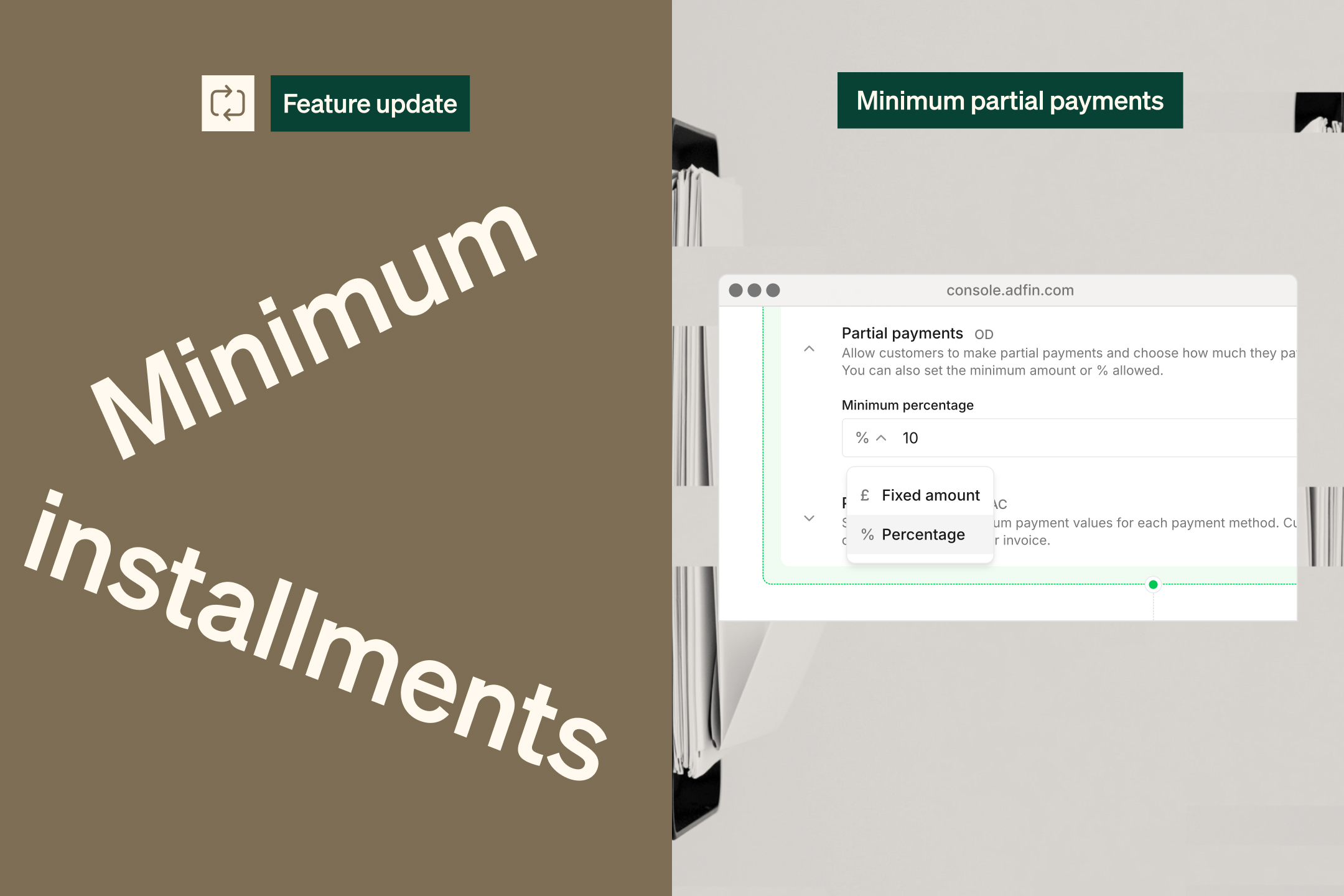
Allow customers to make partial payments

You can now allow your customers to make partial payments when paying On Demand, choosing exactly how much they want to pay. 💰

You can also set a minimum partial payment amount to stay in control of how small those payments can be.

👉 Find this option in your Payment Settings.

December 2, 2025

Manage credit control in Adfin

Credit control just got easier 📊✨

Our new dashboards give you complete flexibility:

  • Group by credit control status or action required
  • Sort and filter by any field
  • Choose exactly which columns you want to see
  • Save your favourite views for quick access ⭐

November 14, 2025

Adfin Autopilot integrated into workflows

🤖 Autopilot is now officially available to all Adfin users!

You can now bring your own email address into Adfin, create adaptive reminder templates, and let Autopilot take care of the chasing - automatically and intelligently.

Whether it’s a first reminder or an overdue follow-up, Autopilot tailors your template to each customer, adds personalised details along with the right payment or mandate links, and sends the message directly from your email address.

You can send personalised reminders from the Customer → Activity → Send Message action, or add them straight into your On Demand workflows.

More personal outreach = faster payments. 💸✨

👉 Head to Get Started in your Adfin account and we'll guide you on how to enable Autopilot.

November 11, 2025

Updated settings layout

⚙️ All your Adfin account settings are now in one place, with a fresh, more intuitive layout — and you can search to find exactly what you need.

👉 Open Settings in the sidebar to find everything in one place.

November 11, 2025

Simplified direct debit mandate statuses

🎯 We've simplified the statuses for direct debit mandates.

The Signed status has been removed, so mandates now transition directly from Awaiting signature to Active.

When a mandate becomes Active, we'll automatically schedule any payments for that customer to be collected by direct debit.

November 11, 2025

Select how you sync payments to Xero

We’ve enhanced our Xero integration so you can now choose how payments without an invoice are synced to Xero. You can:

  • Sync payments as Receive Money transactions 💸
  • Or as Overpayments
  • Choose the account you want the payment coded to — including a Liability account 📘

👉 Head to your Xero configuration in Settings to manage these options.

November 6, 2025

God Mode for seamless account switching and credit control as a service

We’ve launched God Mode, giving you a single login across all your Adfin accounts ⚡⚡

You can now switch between accounts or create new ones straight from the dropdown menu in the top left of the Adfin Console.

It’s easier than ever to refer clients too — you can spin up a new account for them in seconds, then invite them to book an onboarding call and finalise their setup 🙌

This update makes Adfin the perfect hub for credit control as a service, giving you one place to manage all client activity 💼

👉 Find it in your account dropdown at the top of the sidebar in the Adfin Console.

October 14, 2025

Create recurring invoices in Adfin

Save time and stay on top of repeat billing 🙌

You can now set up recurring invoices in Adfin to send automatically on the schedule you choose. Perfect for subscriptions, retainers, or regular clients 💼

Your recurring invoices can also be pushed straight to Xero or QuickBooks, keeping everything in sync 💷✨

October 8, 2025

Adfin Autopilot for smarter credit control

Say hello to smarter, hands-off credit control 🚀

🤖 Autopilot is an end-to-end agentic AI chasing tool. Autopilot can take your existing chasing message templates, adapt them to the relevant context, and send them: automatically.

Adfin now supports connecting to your own email domain, so chasers can come from your email address. More personal chasing = faster payment 📧 

October 7, 2025

Sync invoices to QuickBooks

Great news for QuickBooks users 🎉

Invoices you create in Adfin, whether through our invoice tool or invoice capture, can now be pushed straight to QuickBooks automatically 💨

Once you send an invoice in Adfin, we’ll add it to QuickBooks for you and mark it as paid when the payment comes through 💷

Simple, connected, and one less thing to think about ✅

October 7, 2025

Manage credit control with custom statuses

Credit controllers, this one’s for you 🙌

You can now add custom statuses to any activity that’s at risk, giving you more control over how you track and manage your credit control process 💪

Filter by these new statuses to stay organised and focused.

Adfin will automatically move invoices and payments through to confirmed when they are paid.

October 7, 2025

Easy to create and manage instalment plans

Have a client who’s struggling to pay? Now you can offer an instalment plan that makes things easier for them and keeps cash flowing for you 🙌

Choose how many instalments you’d like and Adfin will take care of the rest, from sending reminders and details of the instalment plan to reconciling each payment automatically 💷

You can choose to edit individual instalment amounts and take a higher up front deposit 💰

Instalment plans work with On Demand payments or Auto Collect, and you can create them for new invoices in Adfin or for invoices you’ve already sent ✨

October 7, 2025

Accept bank transfer with automated credit control and reconciliation

You can now accept bank transfers and let Adfin do the hard work for you 💪

When your client makes a payment, Adfin automatically detects it and updates your records, so chasing stops the moment the money lands 💷

We’ll show your client intermediary bank details right on the payment page, making it simple for them and effortless for you ✨

👉 Please message us if you would like to be part of the early access group for this feature!

September 30, 2025

Upgraded activities to stay on top of what needs your attention

New activities now highlight when something needs action, like when an invoice or payment request isn’t being chased, or if a message fails to deliver 💬

You’ll see clear alerts right in your tables, so nothing slips through the cracks 👀

👉 Find the activities column in the Accept payments table

September 30, 2025

Auto Collect + as a backup for tricky payers

Some clients just won’t sign their direct debit mandate. Now you can set up Auto Collect+ as an automated backup, giving those clients the option to pay using On Demand payments instead 💳

Choose how long after sending the invoice you’d like to offer this option, and Adfin will do the rest. We’ll automatically notify your client and add the extra payment methods to their payment page 🔁

If you like, you can choose to offer this immediately, so your client can pay any way they like. 

👉 Head to payments settings > workflows to enable Auto Collect +

September 30, 2025

Adfin On Demand + to take deposits on card before requesting a direct debit mandate

Say hello to a smoother way to get paid 💷

On Demand + combines card and direct debit payments into one simple journey, so you spend less time chasing invoices and more time running your business 🚀

You can collect an upfront card payment, then invite your customer to sign a direct debit payment for future payments.

Fewer follow-ups, faster payments, happier you 🎉

👉 Head to payments settings > workflows to enable On Demand +, which can be enabled on the workflow level, allowing you to control which clients it is offered to.

September 23, 2025

Import and sync customers your way

We’ve made importing contacts from Xero and QuickBooks smoother than ever ✨

You can now choose to import all customers, or only bring in specific contact groups if you use Xero. You can also decide whether new customers should sync automatically as they’re created 🔄

And don’t worry, if a customer is linked to an Adfin invoice, we’ll always import them so your invoicing keeps running without a hitch 💪

September 23, 2025

An upgraded look for your direct debit mandate page

We’ve refreshed the direct debit page to put your brand front and centre 🎨. It’s cleaner, more modern, and easier for your clients to complete their mandates 💪

Better experiences for them, smoother payments for you 💷

September 15, 2025

Customise your layouts and save views

Make Adfin work your way 🙌

You can now add, remove, and reorder columns, and filter your data more flexibly than ever ✨

You can also save sets of filters as views, making it easy for your team to manage activity in Adfin.

September 9, 2025

Unmark invoices as paid

Made a slip-up? No worries — you can now unmark invoices or payment requests as paid 🙌

Just head to the sidebar, find the same spot where you marked it as paid, and click ‘Unmark as paid’ 🔄

September 9, 2025

Show your business name on customer bank statements for direct debit payments

Make direct debit payments easier to recognise for your clients by showing your business name when they complete direct debit mandates and make payments.

🕵️ This makes payments easier to identify, increasing trust and also easing reconciliation efforts.


👉 Look out for a banner in your Adfin console where you'll have the opportunity to upgrade and use this new functionality.

August 26, 2025

Syncing overpayments, prepayments, and customer credit changes

Good news! Adfin now syncs all payment and credit types from Xero and QuickBooks.

👉 When an invoice is updated with an overpayment, prepayment or credit, we’ll immediately sync this to Adfin and adjust the amount due so your customer always pays the correct amount.

✅ Collection amounts are also automatically adjusted for any change in credit notes, like when you delete a credit note or edit the amount applied on an invoice.

August 26, 2025

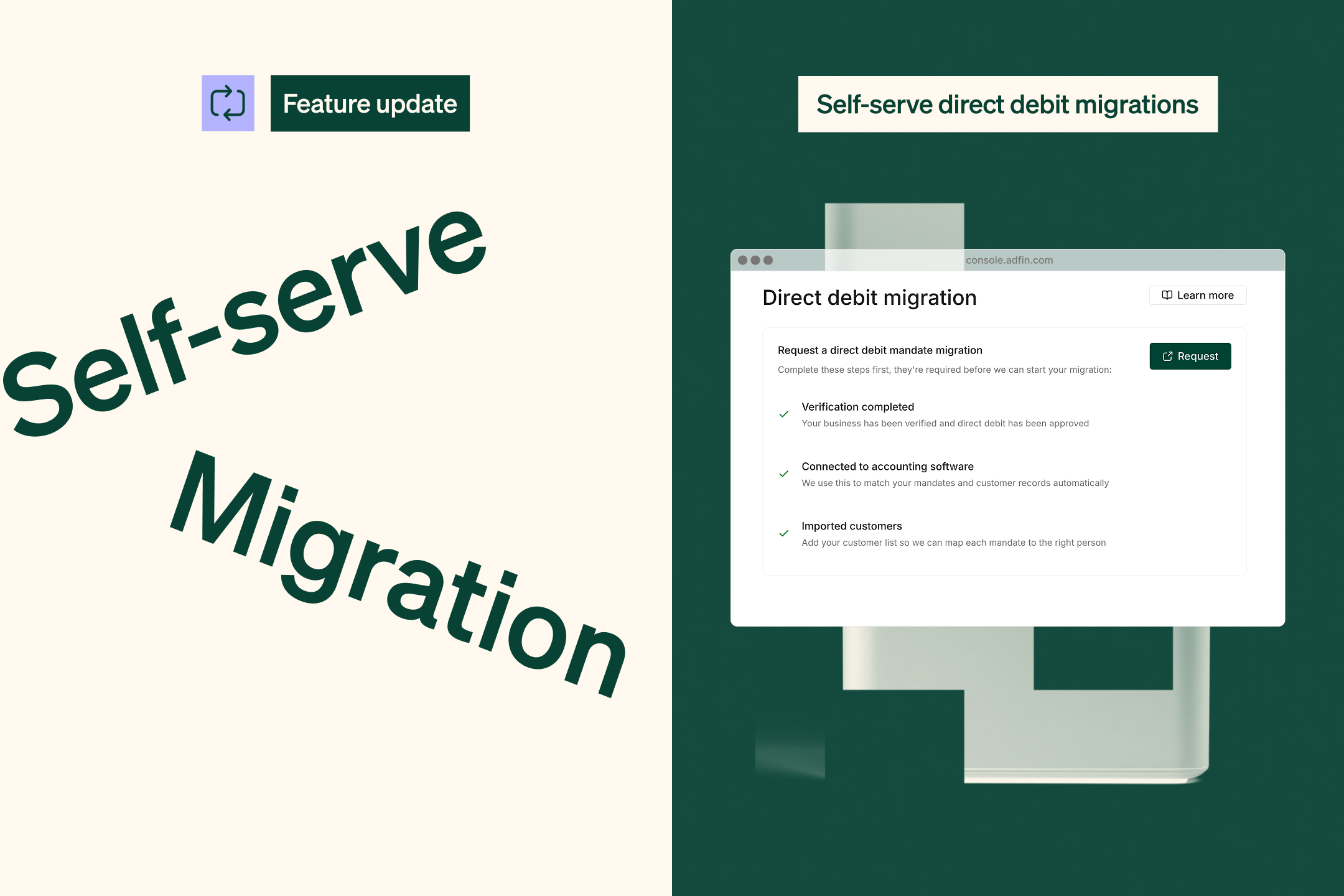
Move your direct debit mandates to Adfin

You can now switch your existing direct debit mandates from another provider to Adfin!

Clients don't need to sign new mandates and your collections won't be interrupted ✍️✨

⚙️ How it works
  • Let your old provider know that you'll be switching your mandates to Adfin
  • We manage all of the process and paperwork
  • On the change date, the mandates will be moved to Adfin
  • We'll also automatically move over any recurring invoices to Adfin so your collections aren't interrupted

💌 Contact us to find out more and we'll guide you through every step of the process.


August 26, 2025

A fresh new look for Adfin

Over the summer ☀️ we’ve been busy giving the Adfin console a makeover. It’s now cleaner, sharper, and easier on the eyes 👀

We’ve built everything using our brand-new design system, so it feels smoother and more consistent across the board 💫

We hope you love the new look as much as we do! 🎨

August 4, 2025

Automatic invoice migration for Xero and QuickBooks

Switching to Adfin just got a whole lot easier. Now, when your customer signs a direct debit mandate with Adfin, we’ll automatically update your invoices in Xero or QuickBooks to use Adfin for payment.

⚙️ How it works
  • Make sure invoice migration is enabled in your settings
  • Send direct debit mandates to your clients
  • Once a mandate is signed and active, we will:
    • Update the branding theme in Xero or the invoice terms in QuickBooks
    • Apply this to both standard and repeating invoices
    • Remove other payment providers from the invoice so there’s nothing you need to do
📬 After the switch
  • You’ll get an email notification when a customer has been migrated
  • We’ll also tag the customer in your dashboard so you can easily keep track

No more manual updates. Just seamless payments through Adfin. ✅

August 1, 2025

Recurring payment requests are here!

You can now create payment schedules in Adfin to collect recurring payments from your customers. This makes it easy to:

  • Collect a fixed amount each week, month, or year
  • Split invoices into instalments by setting the amount and number of occurrences
  • Automate regular payments with less manual work
🛠️ How it works
  • Choose the frequency (weekly, monthly, or yearly)
  • Set a start date and an optional end date
  • Works with both On Demand and Auto Collect payment requests

👉 Where to find it: Click Payment link and toggle on the Recurring option

Recurring payments help you get paid on time and give your customers a smoother experience. Give it a try and save time on your regular billing! 💡

July 8, 2025

View and edit invoices before sending using review sessions

We’ve added a brand new review sessions screen to make it easier than ever to check and edit your invoice data before sending. 🎉

🔎 What you can do

With review sessions, you can:

  • 🧑‍💼 Update or modify customer information
  • 💰 Edit invoice details like amounts or due dates
  • 🔢 Change invoice numbers

You'll be taken to this screen after you upload invoices to Adfin. You’ll save time and feel confident everything’s correct before hitting send.  ✅

July 8, 2025

Upload a CSV file in any format and create up to 200 invoices at a time

We’ve supercharged invoice uploads to make it easier and faster than ever to upload large volumes of invoices. 🚀

🗂 What’s new
  • More file types: Upload invoices as PDFs, images, and now CSV/Excel files (in any format!).
  • Automatic invoice generation: When you upload a CSV, Adfin will create your invoice PDFs automatically. 📄
  • Intelligent capture: Adfin extracts key information from your invoices so you can review everything before sending. 🧐
  • Bigger batches: Upload up to 200 invoices in one go, using a single file type per batch.

Now you can handle big invoice uploads with less effort and get paid faster. 🎉

July 8, 2025

Download data from any Adfin dashboard into CSV

This one’s for all the Excel lovers out there - you can now download everything from the accept payments, manage customers, and view transactions dashboards straight to CSV! 🙌

💾 How it works
  • Head to any of the dashboards.
  • Click the Download CSV button in the top right corner.
  • ✅ Want specific info? Select what you’d like to export before clicking the button.
  • 📥 Want it all? Click Download CSV without selecting anything to grab everything at once.

Now you can analyse, filter, and work with your data however you like, making it easy to reconcile back into other platforms that Adfin is not currently integrated to. 🥳

July 8, 2025

Direct debit payments settle two days faster!

We’ve got great news. Direct debit payments will now be paid out to you two working days faster! 🎉

This applies for all direct debit payments that are submitted from 8th July. We’re excited to bring you quicker payouts so you can get your money sooner.

🗓️ New direct debit timeline
  • Day -1: Adfin sends advance notice of the collection to your customer
  • Day 0: Adfin submits the payment for collection
  • Day 2: The payment is debited from your customer
  • Day 4: The payment is marked as final and paid out to you 💸

Thanks for choosing Adfin. We’re always working to make sure you get paid faster! 🚀

June 19, 2025

The new transactions dashboard has arrived!

We’ve replaced the old Payouts dashboard with a brand new Transactions dashboard — packed with more detail to help you stay on top of your payments.

👉 Where to find it: Click View transactions in the side menu.

💡 What’s inside

Here’s what you can see at a glance:

  • ⚙️ Processing payouts -the payments we’re preparing to send, minus any failures or chargebacks, for each payout date.
  • 💸 Paid out payouts - payments we’ve already sent, with full details of any deductions (like chargebacks or late direct debit failures).
  • 🏦 Available balance - the funds ready to be paid out. Since we usually pay out within a couple of hours of receiving funds, this balance is often zero or negative (for example, due to chargebacks or late payments).

🌟 Other improvements

  • Better payouts over bank holidays! 🎉 We’ve upgraded how we handle payouts during these periods , so you’ll see fewer late payment failures for direct debit payments.

June 11, 2025

🛠️ Adjust column widths and save your table filters

You can now customise how your tables look and work — here's what's new:

  • Resize columns
    Want more space where it matters? Just grab a column divider and drag to adjust the width - all rows are now fully resizable.
  • Save filter views
    After applying filters to a table, click the small cog icon on the right. You can save your current filter setup, give it a name, and use it again anytime.

Perfect for when you want to quickly switch between views or keep things just how you like them.

June 11, 2025

📊 Our new credit control and cash management dashboard is here!

We’ve updated the accept payments dashboard to help you stay on top of your cash flow and credit control, all in one place.

💼 Stay in control of payments

To make credit control easier, Adfin now groups your invoices and payment requests into three  buckets:

  • At risk : Payments that are either overdue, where the mandate hasn’t been signed, or the payment has failed
  • Expected: Payments that are still outstanding or scheduled
  • Confirmed: Payments that have been made but haven’t settled yet

You can use quick filters to switch between buckets in the credit control widget and dive into the details.

💰 Keep track of your cash position

See a summary of your cash activity across this month and last month:

  • What’s still unpaid
  • What’s in progress (being collected)
  • What you’ve already been paid — including Adfin payouts and any payments marked as paid in Adfin or your connected accounting software
🛠️ Customise it your way

You can tailor the dashboard to suit how you work: customise the widgets, collapse sections, and focus on what matters most.

June 3, 2025

Create and send payment links (without an invoice)

Need to take a quick payment? You can now create standalone payment links - no invoice required.

Just head to Payment Links in the side menu and generate a link you can send via WhatsApp, email, or however you like. It’s perfect when you’ve got a client on the phone and want to take a payment quickly and securely.

If you’ve connected your accounting software to Adfin, a payment  will automatically be created in Xero or QuickBooks once the payment comes through.

With payment links you can:

  • Take one-off payments, like down payments or deposits
  • Add a description to the branded payment page
  • Include an internal reference for tracking
  • Set up chasing and workflows
  • Copy and paste the link to send it however you want
  • June 2, 2025

    More upgrades to our Xero and QuickBooks integrations

    We’ve made a few improvements to make syncing smoother and faster:

    • Invoices are now marked as sent in Xero and QuickBooks as soon as you send them from Adfin
    • You can now see which QuickBooks company is connected right from your Adfin settings
    • We’ve upgraded our connections so your invoices sync faster than ever

    May 12, 2025

    Adfin is live for businesses based in Guernsey!

    We're pleased to share that we are currently in beta with a small number of clients in Guernsey, please contact us if you are interested in joining this!

    You'll be pleased to hear that this supports the full range of Adfin functionality, including direct debits, cards and pay by bank!

    May 5, 2025

    Delete any invoice that isn't in submitted or paid from Adfin

    Select "more actions" within the invoice tray to delete any invoice that is not in submitted or paid. This will permanently delete the invoice from Adfin.

    Please note, we do not automatically sync invoice deletion from QuickBooks to Adfin, but we will send you an alert to remind you to delete the invoice in Adfin yourself if this happens.

    May 4, 2025

    Drag and drop up to 50 invoices at once

    We've made a series of upgrades to our invoice upload tool - now you can drag and drop up to 50 invoices at once!

    On top of that, the tool is now faster than ever! So that upload will feel like a breeze... even when working on 50 in parallel.

    As well as this, we've made further improvements to optimise for accuracy and format exceptions.

    April 21, 2025

    Select which direct debit mandate to keep when merging customers

    We've upgraded our merge customer functionality so you have full flexibility to select which associated item from each customer record to keep when merging, making it easier to manage your duplicate customers.

    Now you can merge customer A and B, whilst retaining the details of customer A but the direct debit mandate for customer B - handy when you have previously set up a mandate using an old customer record!

    April 21, 2025

    Copy direct debit mandate link

    For customers with a mandate that is still awaiting signature, you can find a link to their mandate page by selecting the customer record, clicking on "more actions" from the bottom of the tray and copying the mandate link.

    This can be useful if the client is in your office and you want them to complete the mandate in person.

    April 14, 2025

    New Settled status for invoices

    We've added a Settled status for invoices to make it easier to track which invoices Adfin has paid you out for.

    We'll update the invoice status to Settled once we have made the payout of funds to your bank account.

    Please note, if your invoice has been marked as paid by a non-Adfin payment, it will remain in the Paid state.

    April 14, 2025

    Change an invoice between On Demand and Auto Collect

    Now you can change an invoice that you have already sent between On Demand and Auto Collect.

    Click into the invoice and select the "update" option in the workflows section. This will give you the option to update the workflow between On Demand and Auto Collect.

    This is useful if your client would rather pay a larger invoice using credit card, or if they have now agree to start using direct debit.

    April 7, 2025

    Refer you clients and friends with a dedicated link

    Have a client or friend that would love using Adfin? Click "make a referral" in the console and find your dedicated referral link for sign ups.

    Using this link allows us to automatically track who you have referred. In the coming months we'll also be building this out so you can track exactly where your referrals are in their journey with Adfin.

    If you're an Accountant or Bookkkeeper, you can benefit from the ABC club and earn discounts and rewards for referring your clients. You can find more details here: https://www.adfin.com/abc

    For businesses, we'll send you a bottle of wine for every friend you successfully refer!

    March 26, 2025

    Set payment limits by payment method, by customer and by invoice

    Would you like to limit card payments to lower value transactions so you can avoid paying higher fees? Or limit your exposure to direct debit indemnity claims?

    Now you can set payment limits by payment method!

    Head to Settings > Payments to set the limits for your account. You can also select a speific customer and configure custom limits for them, which will override your account settings.

    If you send an invoice that exceeds your payment limits for any payment method, as a back up we'll present a manual bank transfer option to your customer so they can still pay. Although we can't fully automate the payment, we'll still ask them to confirm they have paid you so we can give you the heads up!

    March 26, 2025

    New and improved payment and direct debit mandate pages

    We've made it even easier for your customers to pay their invoices! Our new payment pages are so slick, your customer don't have any more excuses...

    Your branding is now even more prominent and you can also set a secondary branding colour to be used in the background of the pages and emails.

    March 26, 2025

    Customise your chasing workflows

    Create new workflows from scratch or modify existing ones by accessing Settings → Workflows.

    You can create and set default workflows at account level and set different rules for specific customers.

    With custom workflows you can:

    • Set which channels (Email, Whatsapp, or SMS) you use for the initial payment request and subsequent reminders
    • Add multiple reminders at custom intervals before the due date
    • Configure the frequency for overdue reminders
    • Opt to skip the initial distribution step, in case you wish to delay distribution
    • Add custom text to be added each time an invoice is sent - this allows you to add a custom message even when sending the invoice from your accounting software

    March 26, 2025

    Customise Auto Collect workflows for direct debit payments

    Customise how you remind your customers to sign their mandate and what happens when a payment fails.

    With Adfin, if a direct debit payment repeatedly fails we will automatically send your customer an On Demand payment request to pay by card or bank. With this update you can now customise how many times you want to attempt the direct debit before requesting an On Demand payment.

    You can set the default at your account level and also configure different rules for specific customers.

    Now you can:

    • Define how frequently you remind your customers to sign a mandate
    • Add a custom message to include with your mandate requests
    • Select whether to send the invoice immediately when it is issued or wait until the direct debit advance collection notice is sent (we attach the invoice to this) 
    • Select how many times you retry a failed direct debit payment
    • Select if you send an On Demand payment request after all retries have failed and also how frequently you want to send reminders for this payment

    March 26, 2025

    Automatic fall back to SMS when a WhatsApp message fails

    Noticing that some of your WhatsApp notifications are failing because your customers aren't on WhatsApp?

    Now Adfin will automatically send an SMS message instead when the WhatsApp fails!

    March 25, 2025

    Faster and more accurate invoice upload

    We've made more improvements to our invoice upload tool. We're now using multiple LLM AI models in the background to optimise for performance, meaning that things are more accurate and faster than ever!

    March 13, 2025

    Receive an email when a direct debit mandate is signed

    Now you can opt to receive an email each time one of your customers signs a direct debit mandate.

    To enable this, head to settings > notifications and toggle on email alerts for "Direct debit mandate signed".

    March 3, 2025

    Set which email alerts you subscribe to

    Navigate to Settings > Notifications to set which email notifications you receive from Adfin. The preferences you set here only apply your own user account and not to other users on the same Adfin account.

    You can opt in or out of payment success notifications, direct debit collection failures, message delivery failures and issues associated with your connected accounting software.

    February 24, 2025

    Payment success emails

    Now you can opt to receive an email each time a customer pays! Head to settings > notifications to turn this email on or off. This email is sent immediately after your customer has paid.

    This email is configured at a user level, meaning that the setting you choose for yourself will not be applied to other users on your Adfin account.

    February 17, 2025

    New and improved onboarding

    Sign up and get started with Adfin faster than ever before.

    Follow the link on our website to sign up. First you'll need to complete a short form and we'll create an Adfin account for you.

    Once you get access to Adfin, we will ask you to complete verification on your business so you can start accepting payments and then complete four quick steps to configure your account - don't worry, we're here to guide you through the process!

    February 10, 2025

    Void invoices hidden by default

    Voided invoices are now hidden by default from view - to view them, use the status filter on the invoice view and select "Void".

    February 3, 2025

    Sign in with Xero

    We've added sign in with Xero to make it quicker than ever for Xero users to log in to Adfin.

    If you have Xero integrated to Adfin, simply select the "Sign in with Xero" option when signing in to Adfin - we'll use Xero to authenticate you, meaning you don't have to have a separate password for Adfin.

    February 3, 2025

    January useablity improvements

    We've made a number of small improvements to Adfin based on your feedback.

    These include:

    • Email alerts when an invoice which has been submitted for direct debit collection with Adfin is marked as paid in Xero / QuickBooks
    • Enhancing our invoice logs with additional activities so you can track everything that has happened with an invoice
    • Improving our invoice upload feature to remember when a customer has previously been merged on Adfin and automatically link the invoice to the new customer
    • Showing which Xero organisation is linked to Adfin in Settings
    • Hover over the "Paid out" status for a payout to view when your funds are expected to arrive

    January 27, 2025

    View upcoming workflow steps for an invoice

    Click on an invoice and select the log to view the future workflow steps.

    We give you a full view of all future steps that will be taken for the invoice, this includes reminder notifications and direct debit payment collections.

    January 27, 2025

    Set default workflows per customer

    Configure a default chasing workflow for one-time payment requests and retry workflows for direct debits.

    Click into the customer record and use the side tray to select which workflows you would like to apply to the customer as default.

    Any new invoices sent to this customer will follow these workflows by default (unless you choose to override this when you send the invoice). This selection also overrides your account default workflows which are enabled in the settings tab.

    January 27, 2025

    Onboard and accept payments immediately

    We've improved our onboarding process so you can start accepting payments whilst your bank account information is being reviewed.

    This allows you to start sending invoices and accepting payments immediately after your KYB is complete.

    January 26, 2025

    Get started on Adfin with our new onboarding assistant

    We've launched an assistant to help you get started with Adfin.

    Find the onboarding assistant in the bottom left hand side of the console. This will help you navigate the steps to get Adfin set up for your business.

    The assistant will also help you migrate your direct debit payments over to Adfin, making your migration seamless! 

    January 20, 2025

    QuickBooks is now live!

    Adfin's integration with QuickBooks is live! Connect your Adfin account with a QuickBooks organisation to automatically import invoices, customers and make reconciliation easy.

    The new integration supports:

    • Importing customers from QuickBooks to Adfin
    • Syncing customers between Adfin and QuickBooks
    • Importing and syncing invoices from QuickBooks to Adfin
    • Syncing credit notes and payments applied in QuickBooks to Adfin
    • Automatically applying payments made using Adfin to QuickBooks invoices
    • Helping automate your reconciliation process in Quickbooks

    January 20, 2025

    New bulk actions

    We've added new actions to the console to allow resending of invoices and resending of direct debit mandates in bulk.

    Select multiple invoices that have already been sent from the invoice table and use the bottom tray to resend them in bulk.

    Select multiple customers in the customer table and use the bottom tray to resend direct debit mandates in bulk.

    January 20, 2025

    Export payout details to CSV

    For those who like to reconcile in excel, now you can download a CSV with full details of payments and invoices by payout.

    Select payouts on the payout dashboard and export to CSV. We'll provide a download with all the detail of payouts and related payments and invoices. You can use the date picker to select which period you would like and select up to 50 payouts to download into a single CSV.

    January 13, 2025

    Unique invoice numbers

    To make it easier to manage and track your invoices on Adfin, we have now enforced unique invoice numbers.

    If you attempt to upload an invoice which has the same invoice number as an invoice that is already on Adfin, you will receive an error and be prompted to change the invoice number and re-upload the invoice.

    If you attempt to import an invoice from Xero or QuickBooks with a duplicate invoice number, you will be notified by email that this import has failed.

    January 13, 2025

    Additional Adfin user email notifications

    We've updated our Adfin user notification emails to include additional alerts. Now you'll receive an email with the required corrective action when:

    • An invoice has not been sent due to an invalid email address or phone number
    • An invoice has not been imported from Xero / QuickBooks as the email address is invalid
    • An invoice has not been imported from Xero / QuickBooks as currency is not supported by Adfin
    • Xero / QuickBooks has disconnected from Adfin